import { Card, CardGrid } from '@astrojs/starlight/components';
## Features
Based on Preact Signals and provides a fine grained reactivity system that will automatically track dependencies and free them when no longer needed.
Supports Dart JS (HTML), Shelf Server, CLI (and Native), VM, Flutter (Web, Mobile and Desktop). Signals can be used in any Dart project!
Signals are lazy and will only compute values when read. If a signal is not read, it will not be computed.
Every app is different and signals can be composed in multiple ways. There are a few rules to follow but the API surface is small.
Widgets can be rebuilt surgically, only marking dirty the parts of the Widget tree that need to be updated and if mounted.
---
In case when you're receiving a callback that can read some signals, but you don't want to subscribe to them, you can use `untracked` to prevent any subscriptions from happening.
```dart
final counter = signal(0);
final effectCount = signal(0);
final fn = () => effectCount.value + 1;
effect(() {
print(counter.value);
// Whenever this effect is triggered, run `fn` that gives new value
effectCount.value = untracked(fn);
});
```
---
All signals are synchronous but data can be computed asynchronously.
Streams and Futures are the most common async signals, but sometimes you need to compute a value asynchronously and react to changes on input signals.
## computedAsync
Async Computed is syntax sugar around FutureSignal.
_Inspired by [computedAsync](https://ngxtension.netlify.app/utilities/signals/computed-async/) from Angular NgExtension._
computedAsync takes a callback function to compute the value
of the signal. This callback is converted into a Computed signal.
```dart
final movieId = signal('id');
late final movie = computedAsync(() => fetchMovie(movieId()));
```
:::caution
It is important that signals are called before any async gaps with await.
:::
Any signal that is read inside the callback will be tracked as a dependency and the computed signal will be re-evaluated when any of the dependencies change.
## computedFrom
Async Computed is syntax sugar around FutureSignal.
_Inspired by [computedFrom](https://ngxtension.netlify.app/utilities/signals/computed-from/) from Angular NgExtension._
computedFrom takes a list of signals and a callback function to
compute the value of the signal every time one of the signals changes.
```dart
final movieId = signal('id');
late final movie = computedFrom([movieId], (args) => fetchMovie(args.first));
```
Since all dependencies are passed in as arguments there is no need to worry about calling the signals before any async gaps with await.
---
The idea for `connect` comes from Anguar Signals with RxJS:
Start with a signal and then use the `connect` method to create a connector.
Streams will feed Signal value.
```dart
final s = signal(0);
final c = connect(s);
```
### to
Add streams to the connector.
```dart
final s = signal(0);
final c = connect(s);
final s1 = Stream.value(1);
final s2 = Stream.value(2);
c.from(s1).from(s2); // These can be chained
```
### dispose
Cancel all subscriptions.
```dart
final s = signal(0);
final c = connect(s);
final s1 = Stream.value(1);
final s2 = Stream.value(2);
c.from(s1).from(s2);
// or
c << s1 << s2
c.dispose(); // This will cancel all subscriptions
```
---
The `batch` function allows you to combine multiple signal writes into one single update that is triggered at the end when the callback completes.
```dart
import 'package:signals/signals.dart';
final name = signal("Jane");
final surname = signal("Doe");
final fullName = computed(() => name.value + " " + surname.value);
// Logs: "Jane Doe"
effect(() => print(fullName.value));
// Combines both signal writes into one update. Once the callback
// returns the `effect` will trigger and we'll log "Foo Bar"
batch(() {
name.value = "Foo";
surname.value = "Bar";
});
```
When you access a signal that you wrote to earlier inside the callback, or access a computed signal that was invalidated by another signal, we'll only update the necessary dependencies to get the current value for the signal you read from. All other invalidated signals will update at the end of the callback function.
```dart
import 'package:signals/signals.dart';
final counter = signal(0);
final _double = computed(() => counter.value * 2);
final _triple = computed(() => counter.value * 3);
effect(() => print(_double.value, _triple.value));
batch(() {
counter.value = 1;
// Logs: 2, despite being inside batch, but `triple`
// will only update once the callback is complete
print(_double.value);
});
// Now we reached the end of the batch and call the effect
```
Batches can be nested and updates will be flushed when the outermost batch call completes.
```dart
import 'package:signals/signals.dart';
final counter = signal(0);
effect(() => print(counter.value));
batch(() {
batch(() {
// Signal is invalidated, but update is not flushed because
// we're still inside another batch
counter.value = 1;
});
// Still not updated...
});
// Now the callback completed and we'll trigger the effect.
```
---
The `effect` function is the last piece that makes everything reactive. When you access a signal inside its callback function, that signal and every dependency of said signal will be activated and subscribed to. In that regard it is very similar to [`computed(fn)`](/core/computed). By default all updates are lazy, so nothing will update until you access a signal inside `effect`.
```dart
import 'package:signals/signals.dart';
final name = signal("Jane");
final surname = signal("Doe");
final fullName = computed(() => name.value + " " + surname.value);
// Logs: "Jane Doe"
effect(() => print(fullName.value));
// Updating one of its dependencies will automatically trigger
// the effect above, and will print "John Doe" to the console.
name.value = "John";
```
You can destroy an effect and unsubscribe from all signals it was subscribed to, by calling the returned function.
```dart
import 'package:signals/signals.dart';
final name = signal("Jane");
final surname = signal("Doe");
final fullName = computed(() => name.value + " " + surname.value);
// Logs: "Jane Doe"
final dispose = effect(() => print(fullName.value));
// Destroy effect and subscriptions
dispose();
// Update does nothing, because no one is subscribed anymore.
// Even the computed `fullName` signal won't change, because it knows
// that no one listens to it.
surname.value = "Doe 2";
```
## Cleanup Callback
You can also return a cleanup function from an effect. This function will be called when the effect is destroyed.
```dart
import 'package:signals/signals.dart';
final s = signal(0);
final dispose = effect(() {
print(s.value);
return () => print('Effect destroyed');
});
// Destroy effect and subscriptions
dispose();
```
## On Dispose Callback
You can also pass a callback to `effect` that will be called when the effect is destroyed.
```dart
import 'package:signals/signals.dart';
final s = signal(0);
final dispose = effect(() {
print(s.value);
}, onDispose: () => print('Effect destroyed'));
// Destroy effect and subscriptions
dispose();
```
## Preventing Cycles
:::danger
Mutating a signal inside an effect will cause an infinite loop, because the effect will be triggered again. To prevent this, you can use [`untracked(fn)`](/core/untracked) to read a signal without subscribing to it.
```dart
import 'dart:async';
import 'package:signals/signals.dart';
Future main() async {
final completer = Completer();
final age = signal(0);
effect(() {
print('You are ${age.value} years old');
age.value++; // <-- This will throw a cycle error
});
await completer.future;
}
```
:::
---
Future signals can be created by extension or method.
### futureSignal
```dart
final s = futureSignal(() async => 1);
```
### toSignal()
```dart
final s = Future(() => 1).toSignal();
```
## .value, .peek()
Returns [`AsyncState`](/dart/async/state) for the value and can handle the various states.
The `value` getter returns the value of the future if it completed successfully.
> .peek() can also be used to not subscribe in an effect
```dart
final s = futureSignal(() => Future(() => 1));
final value = s.value.value; // 1 or null
```
## .reset()
The `reset` method resets the future to its initial state to recall on the next evaluation.
```dart
final s = futureSignal(() => Future(() => 1));
s.reset();
```
## .refresh()
Refresh the future value by setting `isLoading` to true, but maintain the current state (AsyncData, AsyncLoading, AsyncError).
```dart
final s = futureSignal(() => Future(() => 1));
s.refresh();
print(s.value.isLoading); // true
```
## .reload()
Reload the future value by setting the state to `AsyncLoading` and pass in the value or error as data.
```dart
final s = futureSignal(() => Future(() => 1));
s.reload();
print(s.value is AsyncLoading); // true
```
## Dependencies
By default the callback will be called once and the future will be cached unless a signal is read in the callback.
```dart
final count = signal(0);
final s = futureSignal(() async => count.value);
await s.future; // 0
count.value = 1;
await s.future; // 1
```
If there are signals that need to be tracked across an async gap then use the `dependencies` when creating the `futureSignal` to [`reset`](#.reset()) every time any signal in the dependency array changes.
```dart
final count = signal(0);
final s = futureSignal(
() async => count.value,
dependencies: [count],
);
s.value; // state with count 0
count.value = 1; // resets the future
s.value; // state with count 1
```
---
Stream signals can be created by extension or method.
### streamSignal
```dart
final stream = () async* {
yield 1;
};
final s = streamSignal(() => stream);
```
### toSignal()
```dart
final stream = () async* {
yield 1;
};
final s = stream.toSignal();
```
## .value, .peek()
Returns [`AsyncState`](/dart/async/state) for the value and can handle the various states.
The `value` getter returns the value of the stream if it completed successfully.
> .peek() can also be used to not subscribe in an effect
```dart
final stream = (int value) async* {
yield value;
};
final s = streamSignal(() => stream);
final value = s.value.value; // 1 or null
```
## .reset()
The `reset` method resets the stream to its initial state to recall on the next evaluation.
```dart
final stream = (int value) async* {
yield value;
};
final s = streamSignal(() => stream);
s.reset();
```
## .refresh()
Refresh the stream value by setting `isLoading` to true, but maintain the current state (AsyncData, AsyncLoading, AsyncError).
```dart
final stream = (int value) async* {
yield value;
};
final s = streamSignal(() => stream);
s.refresh();
print(s.value.isLoading); // true
```
## .reload()
Reload the stream value by setting the state to `AsyncLoading` and pass in the value or error as data.
```dart
final stream = (int value) async* {
yield value;
};
final s = streamSignal(() => stream);
s.reload();
print(s.value is AsyncLoading); // true
```
## Dependencies
By default the callback will be called once and the stream will be cached unless a signal is read in the callback.
```dart
final count = signal(0);
final s = streamSignal(() async* {
final value = count();
yield value;
});
await s.future; // 0
count.value = 1;
await s.future; // 1
```
If there are signals that need to be tracked across an async gap then use the `dependencies` when creating the `streamSignal` to [`reset`](#.reset()) every time any signal in the dependency array changes.
```dart
final count = signal(0);
final s = streamSignal(
() async* {
final value = count();
yield value;
},
dependencies: [count],
);
s.value; // state with count 0
count.value = 1; // resets the future
s.value; // state with count 1
```
---
Data is often derived from other pieces of existing data. The `computed` function lets you combine the values of multiple signals into a new signal that can be reacted to, or even used by additional computeds. When the signals accessed from within a computed callback change, the computed callback is re-executed and its new return value becomes the computed signal's value.
> `Computed` class extends the [`Signal`](/core/signal/) class, so you can use it anywhere you would use a signal.
```dart
import 'package:signals/signals.dart';
final name = signal("Jane");
final surname = signal("Doe");
final fullName = computed(() => name.value + " " + surname.value);
// Logs: "Jane Doe"
print(fullName.value);
// Updates flow through computed, but only if someone
// subscribes to it. More on that later.
name.value = "John";
// Logs: "John Doe"
print(fullName.value);
```
Any signal that is accessed inside the `computed`'s callback function will be automatically subscribed to and tracked as a dependency of the computed signal.
> Computed signals are both lazily evaluated and memoized
## Force Re-evaluation
You can force a computed signal to re-evaluate by calling its `.recompute` method. This will re-run the computed callback and update the computed signal's value.
```dart
final name = signal("Jane");
final surname = signal("Doe");
final fullName = computed(() => name.value + " " + surname.value);
fullName.recompute(); // Re-runs the computed callback
```
## Disposing
### Auto Dispose
If a computed signal is created with autoDispose set to true, it will automatically dispose itself when there are no more listeners.
```dart
final s = computed(() => 0, autoDispose: true);
s.onDispose(() => print('Signal destroyed'));
final dispose = s.subscribe((_) {});
dispose();
final value = s.value; // 0
// prints: Signal destroyed
```
A auto disposing signal does not require its dependencies to be auto disposing. When it is disposed it will freeze its value and stop tracking its dependencies.
This means that it will no longer react to changes in its dependencies.
```dart
final s = computed(() => 0);
s.dispose();
final value = s.value; // 0
final b = computed(() => s.value); // 0
// b will not react to changes in s
```
You can check if a signal is disposed by calling the `.disposed` method.
```dart
final s = computed(() => 0);
print(s.disposed); // false
s.dispose();
print(s.disposed); // true
```
### On Dispose Callback
You can attach a callback to a signal that will be called when the signal is destroyed.
```dart
final s = computed(() => 0);
s.onDispose(() => print('Signal destroyed'));
s.dispose();
```
## Custom Computed
You can create a custom computed signal by extending the `Computed` class.
```dart
class MyComputed extends Computed {
MyComputed() : super(() => 0);
}
```
## Flutter
In Flutter if you want to create a signal that automatically disposes itself when the widget is removed from the widget tree and rebuilds the widget when the signal changes, you can use the `createComputed` inside a stateful widget.
```dart
import 'package:flutter/material.dart';
import 'package:signals/signals_flutter.dart';
class CounterWidget extends StatefulWidget {
@override
_CounterWidgetState createState() => _CounterWidgetState();
}
class _CounterWidgetState extends State with SignalsMixin {
late final counter = createSignal(0);
late final isEven = createComputed(() => counter.value.isEven);
late final isOdd = createComputed(() => counter.value.isOdd);
@override
Widget build(BuildContext context) {
return Scaffold(
body: Center(
child: Column(
mainAxisAlignment: MainAxisAlignment.center,
children: [
Text('Counter: even=$isEven, odd=$isOdd'),
ElevatedButton(
onPressed: () => counter.value++,
child: Text('Increment'),
),
],
),
),
);
}
}
```
No `Watch` widget or extension is needed, the signal will automatically dispose itself when the widget is removed from the widget tree.
The `SignalsMixin` is a mixin that automatically disposes all signals created in the state when the widget is removed from the widget tree.
## Testing
Testing computed signals is possible by converting a computed to a stream and testing it like any other stream in Dart.
```dart
test('test as stream', () {
final a = signal(0);
final s = computed(() => a());
final stream = s.toStream();
a.value = 1;
a.value = 2;
a.value = 3;
expect(stream, emitsInOrder([0, 1, 2, 3]));
});
```
`emitsInOrder` is a matcher that will check if the stream emits the values in the correct order which in this case is each value after a signal is updated.
You can also override the initial value of a computed signal when testing. This is is useful for mocking and testing specific value implementations.
```dart
test('test with override', () {
final a = signal(0);
final s = computed(() => a()).overrideWith(-1);
final stream = s.toStream();
a.value = 1;
a.value = 2;
a.value = 2; // check if skipped
a.value = 3;
expect(stream, emitsInOrder([-1, 1, 2, 3]));
});
```
`overrideWith` returns a new computed signal with the same global id sets the value as if the computed callback returned it.
---
The `signal` function creates a new signal. A signal is a container for a value that can change over time. You can read a signal's value or subscribe to value updates by accessing its `.value` property.
```dart
import 'package:signals/signals.dart';
final counter = signal(0);
// Read value from signal, logs: 0
print(counter.value);
// Write to a signal
counter.value = 1;
```
Signals can be created globally, inside classes or functions. It's up to you how you want to structure your app.
It is not recommended to create signals inside effects or computed, as this will create a new signal every time the effect or computed is triggered. This can lead to unexpected behavior.
In Flutter do not create signals inside `build` methods, as this will create a new signal every time the widget is rebuilt.
## Writing to a signal
Writing to a signal is done by setting its `.value` property. Changing a signal's value synchronously updates every [computed](/core/computed) and [effect](/core/effect) that depends on that signal, ensuring your app state is always consistent.
## .peek()
In the rare instance that you have an effect that should write to another signal based on the previous value, but you _don't_ want the effect to be subscribed to that signal, you can read a signals's previous value via `signal.peek()`.
```dart
final counter = signal(0);
final effectCount = signal(0);
effect(() {
print(counter.value);
// Whenever this effect is triggered, increase `effectCount`.
// But we don't want this signal to react to `effectCount`
effectCount.value = effectCount.peek() + 1;
});
```
Note that you should only use `signal.peek()` if you really need it. Reading a signal's value via `signal.value` is the preferred way in most scenarios.
## .value
The `.value` property of a signal is used to read or write to the signal. If used inside an effect or computed, it will subscribe to the signal and trigger the effect or computed whenever the signal's value changes.
```dart
final counter = signal(0);
effect(() {
print(counter.value);
});
counter.value = 1;
```
## Force Update
If you want to force an update for a signal, you can call the `.set(..., force: true)` method. This will trigger all effects and mark all computed as dirty.
```dart
final counter = signal(0);
counter.set(1, force: true);
```
## Disposing
### Auto Dispose
If a signal is created with autoDispose set to true, it will automatically dispose itself when there are no more listeners.
```dart
final s = signal(0, autoDispose: true);
s.onDispose(() => print('Signal destroyed'));
final dispose = s.subscribe((_) {});
dispose();
final value = s.value; // 0
// prints: Signal destroyed
```
A auto disposing signal does not require its dependencies to be auto disposing. When it is disposed it will freeze its value and stop tracking its dependencies.
```dart
final s = signal(0);
s.dispose();
final c = computed(() => s.value);
// c will not react to changes in s
```
You can check if a signal is disposed by calling the `.disposed` method.
```dart
final s = signal(0);
print(s.disposed); // false
s.dispose();
print(s.disposed); // true
```
### On Dispose Callback
You can attach a callback to a signal that will be called when the signal is destroyed.
```dart
final s = signal(0);
s.onDispose(() => print('Signal destroyed'));
s.dispose();
```
## Custom Signal
You can create a custom signal by extending the `Signal` class.
```dart
class MySignal extends Signal {
MySignal(int value) : super(value);
}
```
:::tip
You can apply any number of mixins to a custom signal to add additional functionality.
Mixins:
- [ValueListenableSignalMixin](/mixins/value-listenable) to implement ValueListenable
- [ValueNotifierSignalMixin](/mixins/value-notifier) to implement ValueNotifier
- [ChangeStackSignalMixin](/mixins/change-stack) to add undo and redo functionality
- [TrackedSignalMixin](/mixins/tracked) to add initial and previous value tracking
- [StreamSignalMixin](/mixins/stream) to implement Stream
- [SinkSignalMixin](/mixins/sink) to implement Sink
- [EventSinkSignalMixin](/mixins/event-sink) to implement EventSink
- [ListSignalMixin](/mixins/list) for List value types
- [MapSignalMixin](/mixins/map) for Map value types
- [SetSignalMixin](/mixins/set) for Set value types
- [IterableSignalMixin](/mixins/iterable) for Iterable value types
- [QueueSignalMixin](/mixins/queue) for Queue value types
:::
## Flutter
In Flutter if you want to create a signal that automatically disposes itself when the widget is removed from the widget tree and rebuilds the widget when the signal changes, you can use the `createSignal` inside a stateful widget.
```dart
import 'package:flutter/material.dart';
import 'package:signals/signals_flutter.dart';
class CounterWidget extends StatefulWidget {
@override
_CounterWidgetState createState() => _CounterWidgetState();
}
class _CounterWidgetState extends State with SignalsMixin {
late final counter = createSignal(0);
@override
Widget build(BuildContext context) {
return Scaffold(
body: Center(
child: Column(
mainAxisAlignment: MainAxisAlignment.center,
children: [
Text('Counter: $counter'),
ElevatedButton(
onPressed: () => counter.value++,
child: Text('Increment'),
),
],
),
),
);
}
}
```
No `Watch` widget or extension is needed, the signal will automatically dispose itself when the widget is removed from the widget tree.
The `SignalsMixin` is a mixin that automatically disposes all signals created in the state when the widget is removed from the widget tree.
## Testing
Testing signals is possible by converting a signal to a stream and testing it like any other stream in Dart.
```dart
test('test as stream', () {
final s = signal(0);
final stream = s.toStream(); // create a stream of values
s.value = 1;
s.value = 2;
s.value = 3;
expect(stream, emitsInOrder([0, 1, 2, 3]));
});
```
`emitsInOrder` is a matcher that will check if the stream emits the values in the correct order which in this case is each value after a signal is updated.
You can also override the initial value of a signal when testing. This is is useful for mocking and testing specific value implementations.
```dart
test('test with override', () {
final s = signal(0).overrideWith(-1);
final stream = s.toStream();
s.value = 1;
s.value = 2;
s.value = 3;
expect(stream, emitsInOrder([-1, 1, 2, 3]));
});
```
`overrideWith` returns a new signal with the same global id sets the value as if it was created with it. This can be useful when using async signals or global signals used for dependency injection.
---
`AsyncState` is class commonly used with Future/Stream signals to represent the states the signal can be in.
## AsyncSignal
`AsyncState` is the default state if you want to create a `AsyncSignal` directly:
```dart
final s = asyncSignal(AsyncState.data(1));
s.value = AsyncState.loading(); // or AsyncLoading();
s.value = AsyncState.error('Error', null); // or AsyncError();
```
## AsyncState
`AsyncState` is a sealed union made up of `AsyncLoading`, `AsyncData` and `AsyncError`.
### .future
Sometimes you need to await a signal value in a async function until a value is completed and in this case use the .future getter.
```dart
final s = asyncSignal(AsyncState.loading());
s.value = AsyncState.data(1);
await s.future; // Waits until data or error is set
```
### .isCompleted
Returns true if the future has completed with an error or value:
```dart
final s = asyncSignal(AsyncState.loading());
s.value = AsyncState.data(1);
print(s.isCompleted); // true
```
### .hasValue
Returns true if a value has been set regardless of the state.
```dart
final s = asyncSignal(AsyncState.loading());
print(s.hasValue); // false
s.value = AsyncState.data(1);
print(s.hasValue); // true
```
### .hasError
Returns true if a error has been set regardless of the state.
```dart
final s = asyncSignal(AsyncState.loading());
print(s.hasError); // false
s.value = AsyncState.error('error', null);
print(s.hasError); // true
```
### .isRefreshing
Returns true if the state is refreshing with a loading flag, has a value or error and is not the loading state.
```dart
final s = asyncSignal(AsyncState.loading());
print(s.isRefreshing); // false
s.value = AsyncState.error('error', null, isLoading: true);
print(s.isRefreshing); // true
s.value = AsyncData(1, isLoading: true);
print(s.isRefreshing); // true
```
### .isReloading
Returns true if the state is reloading with having a value or error, and is the loading state.
```dart
final s = asyncSignal(AsyncState.loading());
print(s.isReloading); // false
s.value = AsyncState.loading(data: 1);
print(s.isReloading); // true
s.value = AsyncState.loading(error: ('error', null));
print(s.isReloading); // true
```
### .requireValue
Force unwrap the value of the state and throw an error if it has an error or is null.
```dart
final s = asyncSignal(AsyncState.data(1));
print(s.requireValue); // 1
```
### .value
Return the current value if exists.
```dart
final s = asyncSignal(AsyncState.data(1));
print(s.value); // 1 or null
```
### .error
Return the current error if exists.
```dart
final s = asyncSignal(AsyncState.error('error', null));
print(s.error); // 'error' or null
```
### .stackTrace
Return the current stack trace if exists.
```dart
final s = asyncSignal(AsyncState.error('error', StackTrace(...)));
print(s.stackTrace); // StackTrace(...) or null
```
### .map
If you want to handle the states of the signal `map` will enforce all branching.
```dart
final signal = asyncSignal(AsyncState.data(1));
signal.value.map(
data: (value) => 'Value: $value',
error: (error, stackTrace) => 'Error: $error',
loading: () => 'Loading...',
);
```
### .maybeMap
If you want to handle some of the states of the signal `maybeMap` will provide a default and optional overrides.
```dart
final signal = asyncSignal(AsyncState.data(1));
signal.value.maybeMap(
data: (value) => 'Value: $value',
orElse: () => 'Loading...',
);
```
### Pattern Matching
Instead of `map` and `maybeMap` it is also possible to use [dart switch expressions](https://dart.dev/language/patterns) to handle the branching.
```dart
final signal = asyncSignal(AsyncState.data(1));
final value = switch (signal.value) {
AsyncData data => 'value: ${data.value}',
AsyncError error => 'error: ${error.error}',
AsyncLoading() => 'loading',
};
```
---
Since Signals 6.0.0, you can use the `signals_flutter` import to create signals that extend [ValueListenable](https://api.flutter.dev/flutter/foundation/ValueListenable-class.html).
```dart
import 'package:signals/signals_flutter.dart';
final count = computed(() => 0);
assert(count is Signal);
assert(count is FlutterComputed);
assert(count is FlutterReadonlySignal);
assert(count is ValueListenable);
```
## Custom Signal
To create a custom signal that extends ValueListenable, use the [`ValueListenableSignalMixin`](/mixins/value-listenable) mixin.
```dart
import 'package:signals/signals_flutter.dart';
class MySignal extends Computed with ValueListenableSignalMixin {
MySignal(int Function() cb) : super(cb);
}
```
Or extend FlutterComputed directly.
```dart
import 'package:signals/signals_flutter.dart';
class MySignal extends FlutterComputed {
MySignal(int Function() cb) : super(cb);
}
```
---
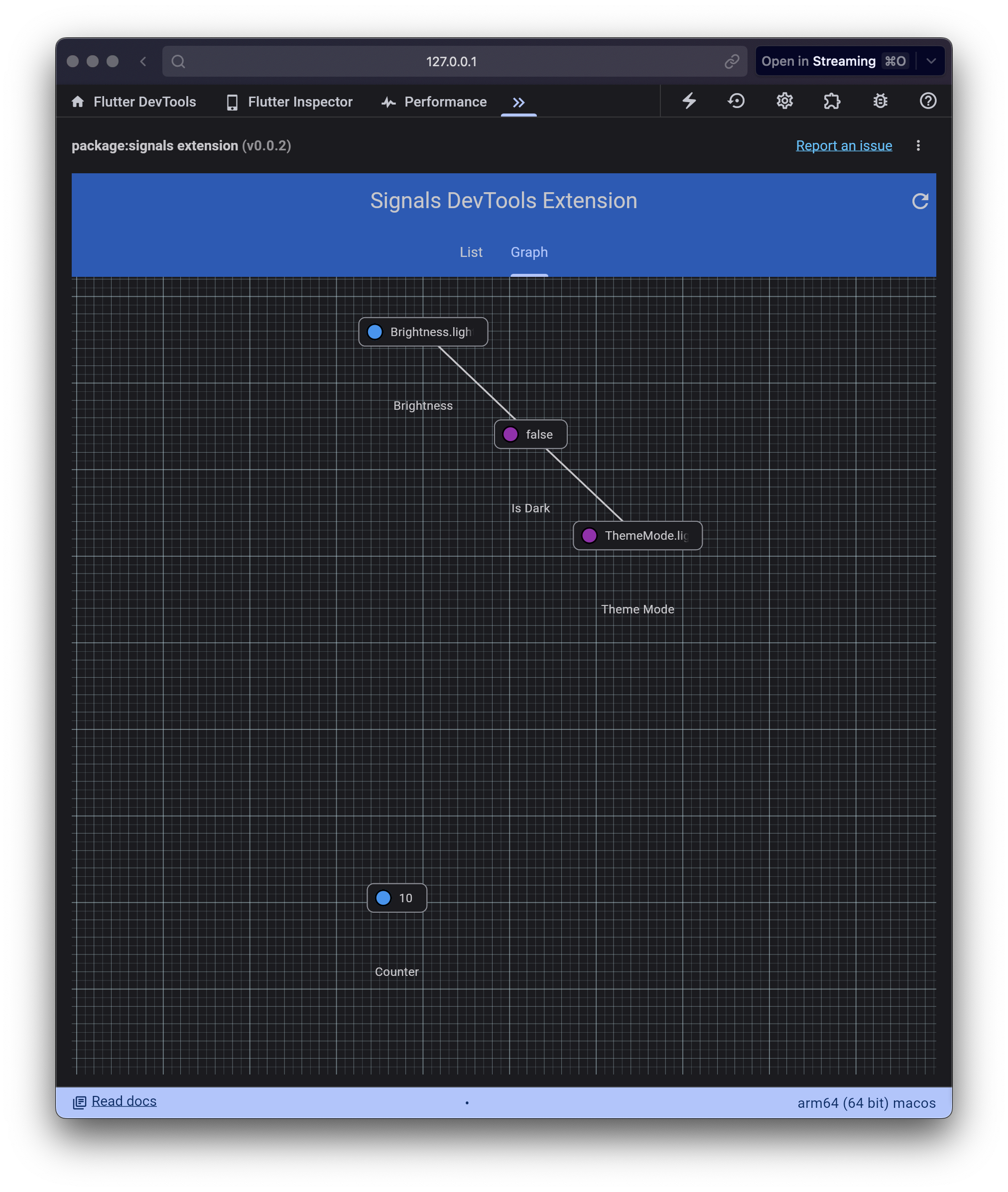
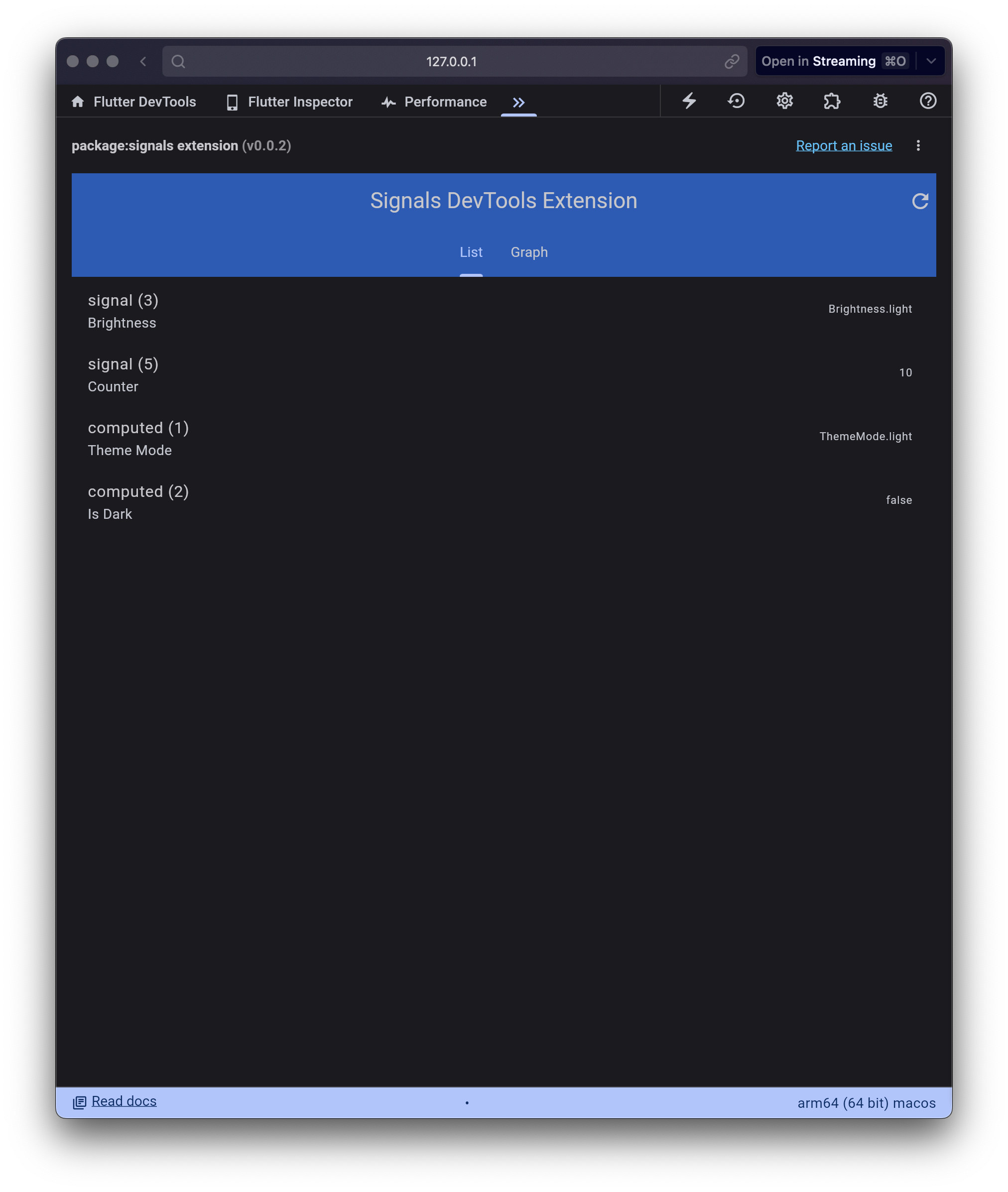
There is an early version of a devtools extension included with the package.
---
Helper library to make working with [signals](https://pub.dev/packages/signals) in [flutter_hooks](https://pub.dev/packages/flutter_hooks) easier.
```dart
import 'package:flutter/material.dart';
import 'package:flutter_hooks/flutter_hooks.dart';
import 'package:signals_hooks/signals_hooks.dart';
class Example extends HookWidget {
const Example({super.key});
@override
Widget build(BuildContext context) {
final count = useSignal(0);
final doubleCount = useComputed(() => count.value * 2);
useSignalEffect(() {
debugPrint('count: $count, double: $doubleCount');
});
return Scaffold(
body: Center(
child: Text('Count: $count'),
),
floatingActionButton: FloatingActionButton(
onPressed: () => count.value++,
child: const Icon(Icons.add),
),
);
}
}
```
All of the signals and effects created will get cleaned up when the widget gets unmounted.
## Core
### useSignal
How to create a new signal inside of a hook widget:
```dart
class Example extends HookWidget {
@override
Widget build(BuildContext context) {
final count = useSignal(0);
return Text('Count: $count');
}
}
```
The value will auto rebuild the widget when it changes.
### useComputed
How to create a new computed signal inside of a hook widget:
```dart
class Example extends HookWidget {
@override
Widget build(BuildContext context) {
final count = useSignal(0);
final countStr = useComputed(() => count.toString());
return Text('Count: $countStr');
}
}
```
The value will auto rebuild the widget when it changes.
### useSignalEffect
How to create a new effect inside of a hook widget:
```dart
class Example extends HookWidget {
@override
Widget build(BuildContext context) {
final count = useSignal(0);
useSignalEffect(() {
print('count: $count');
});
return Text('Count: $count');
}
}
```
### useExistingSignal
How to bind an existing signal inside of a hook widget:
```dart
class Example extends HookWidget {
final Signal count;
const Example(this.count, {super.key});
@override
Widget build(BuildContext context) {
final counter = useExistingSignal(count);
return Text('Count: $counter');
}
}
```
The value will auto rebuild the widget when it changes.
### useSignalValue
How to get the value of a signal directly:
```dart
class Example extends HookWidget {
final Signal count;
const Example(this.count, {super.key});
@override
Widget build(BuildContext context) {
final counter = useSignalValue(count);
return Text('Count: $counter');
}
}
```
The value will auto rebuild the widget when it changes.
## Async
### useFutureSignal
Creates a new `FutureSignal` and subscribes to it.
```dart
class MyWidget extends HookWidget {
@override
Widget build(BuildContext context) {
final future = useFutureSignal(() => Future.delayed(const Duration(seconds: 1), () => 1));
return future.value.map(
data: (value) => Text('$value'),
error: (error, stack) => Text('$error'),
loading: () => const CircularProgressIndicator(),
);
}
}
```
### useStreamSignal
Creates a new `StreamSignal` and subscribes to it.
```dart
class MyWidget extends HookWidget {
@override
Widget build(BuildContext context) {
final stream = useStreamSignal(() => Stream.periodic(const Duration(seconds: 1), (i) => i));
return stream.value.map(
data: (value) => Text('$value'),
error: (error, stack) => Text('$error'),
loading: () => const CircularProgressIndicator(),
);
}
}
```
### useAsyncSignal
Creates a new `AsyncSignal` and subscribes to it.
```dart
class MyWidget extends HookWidget {
@override
Widget build(BuildContext context) {
final signal = useAsyncSignal(AsyncState.loading());
return signal.value.map(
data: (value) => Text('$value'),
error: (error, stack) => Text('$error'),
loading: () => const CircularProgressIndicator(),
);
}
}
```
### useAsyncComputed
Creates a new `FutureSignal` from a computed async value and subscribes to it.
```dart
class MyWidget extends HookWidget {
@override
Widget build(BuildContext context) {
final count = useSignal(0);
final future = useAsyncComputed(() async {
await Future.delayed(const Duration(seconds: 1));
return count.value * 2;
}, dependencies: [count]);
return future.value.map(
data: (value) => Text('$value'),
error: (error, stack) => Text('$error'),
loading: () => const CircularProgressIndicator(),
);
}
}
```
## Collections
### useListSignal
Creates a new `ListSignal` and subscribes to it.
```dart
class MyWidget extends HookWidget {
@override
Widget build(BuildContext context) {
final list = useListSignal([1, 2, 3]);
return Text('${list.value}');
}
}
```
### useSetSignal
Creates a new `SetSignal` and subscribes to it.
```dart
class MyWidget extends HookWidget {
@override
Widget build(BuildContext context) {
final set = useSetSignal({1, 2, 3});
return Text('${set.value}');
}
}
```
### useMapSignal
Creates a new `MapSignal` and subscribes to it.
```dart
class MyWidget extends HookWidget {
@override
Widget build(BuildContext context) {
final map = useMapSignal({'a': 1, 'b': 2});
return Text('${map.value}');
}
}
```
## Flutter
### useValueNotifierToSignal
Creates a new `Signal` from a `ValueNotifier` and subscribes to it.
```dart
class MyWidget extends HookWidget {
@override
Widget build(BuildContext context) {
final notifier = useValueNotifier(0);
final signal = useValueNotifierToSignal(notifier);
return Text('${signal.value}');
}
}
```
### useValueListenableToSignal
Creates a new `ReadonlySignal` from a `ValueListenable` and subscribes to it.
```dart
class MyWidget extends HookWidget {
@override
Widget build(BuildContext context) {
final notifier = useValueNotifier(0);
final signal = useValueListenableToSignal(notifier);
return Text('${signal.value}');
}
}
```
## Testing
To test hooks that use signals you can use `flutter_test` and `HookBuilder`.
Here is an example of how to test `useSignal`:
```dart
import 'package:flutter/widgets.dart';
import 'package:flutter_hooks/flutter_hooks.dart';
import 'package:flutter_test/flutter_test.dart';
import 'package:signals_hooks/signals_hooks.dart';
void main() {
testWidgets('useSignal', (tester) async {
late Signal state;
await tester.pumpWidget(
HookBuilder(builder: (context) {
state = useSignal(42);
return GestureDetector(
onTap: () => state.value++,
child: Text('$state', textDirection: TextDirection.ltr),
);
}),
);
expect(state.value, 42);
expect(find.text('42'), findsOneWidget);
// Click text and wait
await tester.tap(find.text('42'));
await tester.pumpAndSettle();
expect(state.value, 43);
expect(find.text('43'), findsOneWidget);
});
}
```
You can find more examples in the [test folder](https://github.com/rodydavis/signals.dart/tree/main/packages/signals_hooks/test).
---
SignalProvider is an [InheritedNotifier](https://api.flutter.dev/flutter/widgets/InheritedNotifier-class.html) widget that allows you to pass signals around the widget tree.
```dart
import 'package:signals/signals_flutter.dart';
import 'package:flutter/material.dart';
class Counter extends FlutterSignal {
Counter([super.value = 0]);
void increment() => value++;
}
class Example extends StatelessWidget {
const Example({super.key});
@override
Widget build(BuildContext context) {
return SignalProvider(
create: () => Counter(0),
child: Scaffold(
appBar: AppBar(
backgroundColor: Theme.of(context).colorScheme.inversePrimary,
title: const Text('Counter'),
),
body: Center(
child: Column(
mainAxisAlignment: MainAxisAlignment.center,
children: [
const Text(
'You have pushed the button this many times:',
),
Builder(builder: (context) {
final counter = SignalProvider.of(context);
return Text(
'$counter',
style: Theme.of(context).textTheme.headlineMedium,
);
}),
],
),
),
floatingActionButton: Builder(builder: (context) {
final counter = SignalProvider.of(context, listen: false)!;
return FloatingActionButton(
onPressed: counter.increment,
tooltip: 'Increment',
child: const Icon(Icons.add),
);
}),
),
);
}
}
```
:::note
The signal in the `create` method needs to extend `FlutterReadonlySignal` which can be from a signal or computed created with the flutter import or by extending `FlutterReadonlySignal`, `FlutterSignal` or `FlutterComputed`.
:::
---
Since Signals 6.0.0, you can use the `signals_flutter` import to create signals that extend [ValueNotifier](https://api.flutter.dev/flutter/foundation/ValueNotifier-class.html).
```dart
import 'package:signals/signals_flutter.dart';
final count = signal(0);
assert(count is Signal);
assert(count is FlutterSignal);
assert(count is FlutterReadonlySignal);
assert(count is ValueNotifier);
```
## Custom Signal
To create a custom signal that extends ValueNotifier, use the [`ValueNotifierSignalMixin`](/mixins/value-notifier) mixin.
```dart
import 'package:signals/signals_flutter.dart';
class MySignal extends Signal with ValueNotifierSignalMixin {
MySignal(int value) : super(value);
}
```
Or extend FlutterSignal directly.
```dart
import 'package:signals/signals_flutter.dart';
class MySignal extends FlutterSignal {
MySignal(int value) : super(value);
}
```
---
:::tip
As of Signals 6.0.0 any Computed created with the flutter import implement ValueListenable by default.
```dart
import 'package:signals/signals_flutter.dart';
final count = computed(() => 0);
assert(count is Computed);
assert(count is ValueListenable);
```
:::
To create a readonly signal from a `ValueListenable`, use the `toSignal` extension:
```dart
final ValueListenable listenable = ValueNotifier(10);
final signal = listenable.toSignal();
```
---
IterableSignalMixin is a mixin for a Signal that adds reactive methods for [Iterable](https://api.flutter.dev/flutter/dart-core/Iterable-class.html).
:::note
This mixin only works with signals that have a value type of `Iterable`.
:::
```dart
class MySignal extends Signal>
with IterableSignalMixin> {
MySignal(super.internalValue);
}
void main() {
final signal = MySignal([1, 2, 3]);
effect(() {
print(signal.length);
});
}
```
---
EventSinkSignalMixin is a mixin for a Signal that implements [EventSink](https://api.flutter.dev/flutter/dart-async/EventSink-class.html).
:::note
This mixin only works with signals that have a value type of `AsyncState`.
:::
```dart
class MySignal extends Signal> with EventSinkSignalMixin {
MySignal(int value) : super(AsyncState.data(value));
}
void main() {
final signal = MySignal(0);
signal.add(1);
print(signal.value.hasValue); // true
print(signal.value.value); // 1
signal.addError('error');
print(signal.value.hasError); // true
print(signal.value.error); // error
signal.close();
print(signal.disposed); // true
}
```
This allows you to use the signal as a EventSink anywhere you would use a EventSink in Dart.
## .add()
When `add` is called it will set the value of the signal.
## .addError()
When `addError` is called it will set the error of the signal.
## .close()
When `close` is called it will dispose the signal and remove all listeners.
---
ListSignalMixin is a mixin for a Signal that adds reactive methods for [List](https://api.flutter.dev/flutter/dart-core/List-class.html).
:::note
This mixin only works with signals that have a value type of `List`.
:::
```dart
class MySignal extends Signal>
with IterableSignalMixin>, ListSignalMixin> {
MySignal(super.internalValue);
}
void main() {
final signal = MySignal([1, 2, 3]);
effect(() {
print(signal.length);
});
signal.add(4);
signal.remove(1);
print(signal.contains(2)); // true
}
```
---
:::tip
As of Signals 6.0.0 any Signal created with the flutter import implement ValueNotifier by default.
```dart
import 'package:signals/signals_flutter.dart';
final count = signal(0);
assert(count is Signal);
assert(count is ValueNotifier);
```
You can replace any `ValueNotifier` with a `Signal` and implement both APIs.
```diff
- import 'package:flutter/foundation.dart';
+ import 'package:signals/signals_flutter.dart';
- final count = ValueNotifier(0);
+ final count = signal(0);
count.addListener(() => print(count.value));
count.value = 1;
print(count.value);
count.notifyListeners();
count.dispose();
```
:::
To create a mutable signal from a `ValueNotifier`, use the `toSignal` extension:
```dart
final notifier = ValueNotifier(10);
final signal = notifier.toSignal();
```
Setting the value on the signal or notifier will update the other.
---
ChangeStackSignalMixin is a mixin for a Signal that adds undo and redo functionality.
:::note
If you are just looking for initial and previous values, use the [TrackedSignalMixin](/mixins/tracked).
:::
```dart
class MySignal extends Signal with ChangeStackSignalMixin {
MySignal(super.internalValue);
}
void main() {
final signal = MySignal(0);
signal.value = 1;
print(signal.canUndo); // true
signal.undo();
print(signal.value); // 0
print(signal.canUndo); // false
signal.redo();
print(signal.value); // 1
}
```
:::caution
This mixin only works with values that are immutable or are copied when changed otherwise the initial and previous value will always be the same.
:::
## Setting a limit
You can set a limit to the number of changes that can be undone with the `limit` parameter.
```diff
class MySignal extends Signal with ChangeStackSignalMixin {
MySignal(int value) : super(value);
+ @override
+ int limit = 3;
}
---
By default, Signals are uni-directional but can be used in a bi-directional way if needed.
:::caution
Bi-directional data flow should only be used when necessary as it can lead to infinite loops if not used correctly.
:::
Consider the following example:
```dart
final a = signal(0);
final b = signal(0);
effect(() {
b.value = a.value + 1;
});
effect(() {
a.value = b.value + 1;
});
```
In this example, `a` and `b` are two signals that are dependent on each other. When `a` changes, `b` should update, and when `b` changes, `a` should update.
This however can lead to an infinite loop and will throw a `EffectCycleDetectionError`. To prevent this, you can use the `untracked` method to prevent the signal from updating itself.
```dart
final a = signal(0);
final b = signal(0);
effect(() {
b.value = untracked(() => a.value + 1);
});
effect(() {
a.value = untracked(() => b.value + 1);
});
```
This will prevent the infinite loop and allow the signals to update each other without causing an error.
Signals are synchronous and will update immediately when the value is set. This means that the value will be updated before the next effect is run. This allows you to create bi-directional data flow in a predictable way.
---
## Watch
To watch a signal for changes in Flutter, use the `Watch` widget. This will only rebuild this widget method and not the entire widget tree.
```dart
final signal = signal(10);
...
@override
Widget build(BuildContext context) {
return Watch((context) => Text('$signal'));
}
```
This will also automatically unsubscribe when the widget is disposed.
Any inherited widgets referenced to inside the Watch scope will be subscribed to for updates ([MediaQuery](https://api.flutter.dev/flutter/widgets/MediaQuery-class.html), [Theme](https://api.flutter.dev/flutter/material/Theme-class.html), etc.) and retrigger the builder method.
There is also a drop in replacement for builder:
```diff
final signal = signal(10);
...
@override
Widget build(BuildContext context) {
- return Builder(
+ return Watch.builder(
builder: (context) => Text('$signal'),
);
}
```
## WatchBuilder
If you need to pass an optional child widget, use the `WatchBuilder` widget.
```dart
final signal = signal(10);
...
@override
Widget build(BuildContext context) {
return WatchBuilder(
builder: (context, child) {
return InkWell(
onTap: () => signal.value++,
child: Row(
children: [
Text('$signal: '),
child!,
],
),
);
},
child: const Icon(Icons.add),
);
}
```
## .watch(context)
If you need to map to a widget property use the `watch` extension method. This will infer the type and subscribe to the signal.
```dart
final fontSize = signal(10);
...
@override
Widget build(BuildContext context) {
return Text('Hello World',
style: TextStyle(fontSize:fontSize.watch(context)),
);
}
```
It is recommended to use `Watch` instead of `.watch(context)` as it will automatically unsubscribe when the widget is disposed instead of waiting on the garbage collector via [WeakReferences](https://api.flutter.dev/flutter/dart-core/WeakReference-class.html).
### Rebuilds
To protect against unnecessary rebuilds, the `watch` extension will only subscribe once to the nearest element and mark the widget as dirty.
This means that if you have multiple widgets that are watching the same signal, only the first one will be subscribed to the signal and multiple updates will be batched together.
It is also possible to isolate the rebuilds with the `Builder` widget, however it is recommended to use `Watch` or `SignalWidget` instead.
```dart
final signal = signal(10);
...
@override
Widget build(BuildContext context) {
// Called once
return Column(
children: [
Builder(
builder: (context) {
// Called every time the signal changes
final count = signal.watch(context);
return Text('$count');
},
),
Text('Not rebuilt'),
],
);
}
```
## Selectors
With signals instead of using `select` you instead create a new `computed` signal that is derived from the original signal.
```dart
final signal = signal((a: 1, b: 2));
final computed = computed(() => signal.value.a);
...
@override
Widget build(BuildContext context) {
return Watch((_) => Text('$computed'));
}
```
It is also possible to select from the signal directly:
```dart
final signal = signal((a: 1, b: 2));
final computed = signal.select((s) => s.value.a);
...
@override
Widget build(BuildContext context) {
return Watch((_) => Text('$computed'));
}
```
---
When you need to store the state of your signals between app launches you can create a `PersistedSignal` from this example code.
You need to have a store that can be [SharedPreferences](https://pub.dev/packages/shared_preferences), [SQLite](https://pub.dev/packages/sqlite3), in memory, or any other storage solution. The store just needs to be able to save and restore the data.
```dart
abstract class KeyValueStore {
Future setItem(String key, String value);
Future getItem(String key);
Future removeItem(String key);
}
```
You can create an in-memory store for testing:
```dart
class InMemoryStore implements KeyValueStore {
final Map _store = {};
@override
Future getItem(String key) async {
return _store[key];
}
@override
Future removeItem(String key) async {
_store.remove(key);
}
@override
Future setItem(String key, String value) async {
_store[key] = value;
}
}
```
For this example we are going to be using SharedPreferences:
```dart
class SharedPreferencesStore implements KeyValueStore {
SharedPreferencesStore();
SharedPreferences? prefs;
Future init() async {
prefs ??= await SharedPreferences.getInstance();
return prefs!;
}
@override
Future getItem(String key) async {
final prefs = await init();
return prefs.getString(key);
}
@override
Future removeItem(String key) async {
final prefs = await init();
prefs.remove(key);
}
@override
Future setItem(String key, String value) async {
final prefs = await init();
prefs.setString(key, value);
}
}
```
:::note
The `SharedPreferences` will lazy load the instance when it is needed but you can also initialize before and pass it in the constructor.
:::
By default we can encode and decode the value to and from JSON:
```dart
abstract class PersistedSignal extends FlutterSignal
with PersistedSignalMixin {
PersistedSignal(
super.internalValue, {
super.autoDispose,
super.debugLabel,
required this.key,
required this.store,
});
@override
final String key;
@override
final KeyValueStore store;
}
mixin PersistedSignalMixin on Signal {
String get key;
KeyValueStore get store;
bool loaded = false;
Future init() async {
try {
final val = await load();
super.value = val;
} catch (e) {
debugPrint('Error loading persisted signal: $e');
} finally {
loaded = true;
}
}
@override
T get value {
if (!loaded) init().ignore();
return super.value;
}
@override
set value(T value) {
super.value = value;
save(value).ignore();
}
Future load() async {
final val = await store.getItem(key);
if (val == null) return value;
return decode(val);
}
Future save(T value) async {
final str = encode(value);
await store.setItem(key, str);
}
T decode(String value) => jsonDecode(value);
String encode(T value) => jsonEncode(value);
}
```
:::note
We create a mixin so we can use it in other custom signals and share logic between signals_core and signals_flutter.
:::
This can work in a lot of cases, but we might want to handle specific cases like enums:
```dart
class EnumSignal extends PersistedSignal {
EnumSignal(super.val, String key, this.values)
: super(
key: key,
store: SharedPreferencesStore(),
);
final List values;
@override
T decode(String value) => values.firstWhere((e) => e.name == value);
@override
String encode(T value) => value.name;
}
```
Or if you are in Flutter we can persist color values:
```dart
class ColorSignal extends PersistedSignal {
ColorSignal(super.val, String key)
: super(
key: key,
store: SharedPreferencesStore(),
);
@override
String encode(Color value) => value.value.toString();
@override
Color decode(String value) => Color(int.parse(value));
}
```
## Example
```dart
class AppTheme {
final sourceColor = ColorSignal(
Colors.blue,
'sourceColor',
);
final themeMode = EnumSignal(
ThemeMode.system,
'themeMode',
ThemeMode.values,
);
static AppTheme instance = AppTheme();
Future init() async {
await Future.wait([
sourceColor.init(),
themeMode.init(),
]);
}
}
void main() async{
final theme = AppTheme.instance;
// We need to init before running the app to prevent the theme from flickering
await theme.init();
runApp(MyApp());
}
class MyApp extends StatelessWidget {
@override
Widget build(BuildContext context) {
final theme = AppTheme.instance;
return MaterialApp(
theme: ThemeData.light().copyWith(
colorScheme: ColorScheme.fromSeed(
seedColor: theme.sourceColor.watch(context),
brightness: Brightness.light,
),
),
darkTheme: ThemeData.dark().copyWith(
colorScheme: ColorScheme.fromSeed(
seedColor: theme.sourceColor.watch(context),
brightness: Brightness.dark,
),
),
themeMode: theme.themeMode.watch(context),
home: Scaffold(
appBar: AppBar(
title: Text('Persisted Signals'),
),
body: Center(
child: Column(
mainAxisAlignment: MainAxisAlignment.center,
children: [
ElevatedButton(
onPressed: () {
theme.sourceColor.value = Colors.red;
},
child: Text('Change Color'),
),
ElevatedButton(
onPressed: () {
theme.themeMode.value = ThemeMode.dark;
},
child: Text('Change Theme'),
),
],
),
),
),
);
}
}
```
Now when we run the app and make changes, if we close the app and reopen it, the changes will persist offline.
---
Signals is a new **core primitive reactivity library** and not a framework which means it can be used with any dependency injection solution or none at all.
This library aims to adapt to any application architecture and you decide how you want to manage your signals.
This guide will show you how to use Signals with popular DI solutions.
## Provider
[Provider](https://pub.dev/packages/provider) is a simple way to provide objects to your widgets.
```dart
import 'package:signals/signals_flutter.dart';
import 'package:provider/provider.dart';
import 'package:flutter/material.dart';
void main() {
runApp(
Provider(
create: (_) => signal(0),
dispose: (_, instance) => instance.dispose(),
child: MyApp(),
),
);
}
class MyApp extends StatelessWidget {
@override
Widget build(BuildContext context) {
final counter = context.read>();
return MaterialApp(
home: Scaffold(
appBar: AppBar(
title: Text('Signals with Provider'),
),
body: Center(
child: Watch((context) => Text('Value: $signal')),
),
floatingActionButton: FloatingActionButton(
onPressed: () => counter.value++,
child: Icon(Icons.add),
),
),
);
}
}
```
> Note: `Consumer` can also be used instead of Watch.
## GetIt
[GetIt](https://pub.dev/packages/get_it) is a simple service locator that can be used in any Dart or Flutter project.
```dart
import 'package:signals/signals_flutter.dart';
import 'package:get_it/get_it.dart';
import 'package:flutter/material.dart';
void main() {
GetIt.I.registerSingleton>(signal(0));
runApp(MyApp());
}
class MyApp extends StatelessWidget {
@override
Widget build(BuildContext context) {
final counter = GetIt.I.get>();
return MaterialApp(
home: Scaffold(
appBar: AppBar(
title: Text('Signals with GetIt'),
),
body: Center(
child: Watch((context) => Text('Value: $signal')),
),
floatingActionButton: FloatingActionButton(
onPressed: () => counter.value++,
child: Icon(Icons.add),
),
),
);
}
}
```
## Riverpod
[Riverpod](https://pub.dev/packages/riverpod) is a data-binding and reactive caching framework for Flutter and Dart.
```dart
import 'package:signals/signals_flutter.dart';
import 'package:flutter_riverpod/flutter_riverpod.dart';
import 'package:riverpod_annotation/riverpod_annotation.dart';
import 'package:flutter/material.dart';
part 'main.g.dart';
@riverpod
Signal counter() => signal(0);
void main() {
runApp(ProviderScope(child: MyApp()));
}
class MyApp extends ConsumerWidget {
@override
Widget build(BuildContext context, WidgetRef ref) {
final counter = ref.read(counterProvider);
return MaterialApp(
home: Scaffold(
appBar: AppBar(
title: Text('Signals with Riverpod'),
),
body: Center(
child: Watch((context) => Text('Value: $counter')),
),
floatingActionButton: FloatingActionButton(
onPressed: () => counter.value++,
child: Icon(Icons.add),
),
),
);
}
}
```
## InheritedWidget
InheritedWidget is a simple built in way to provide objects to your widgets. This comes at the cost of storing a single signal per type.
> Note: This is a new feature added in version 5.0.0 and is still experimental.
```dart
import 'package:signals/signals_flutter.dart';
import 'package:signals/signals_flutter_extended.dart';
import 'package:flutter/material.dart';
void main() {
runApp(
MaterialApp(
home: SignalProvider.value(
value: 0,
child: MyApp(),
),
),
);
}
class MyApp extends StatelessWidget {
@override
Widget build(BuildContext context) {
final counter = SignalProvider.of(context);
return MaterialApp(
home: Scaffold(
appBar: AppBar(
title: Text('Signals with InheritedWidget'),
),
body: Center(
child: Watch((context) => Text('Value: $counter')),
),
floatingActionButton: FloatingActionButton(
onPressed: () => counter.value++,
child: Icon(Icons.add),
),
),
);
}
}
```
If you want to define multiple signals with the same type, then you will need to create custom classes for the container.
```dart
class Counter extends Signal {
Counter(int value) : super(value);
}
...
home: SignalProvider(
instance: Counter(0),
child: MyApp(),
),
...
final counter = SignalProvider.of(context);
counter.value++;
```
## Lite Ref
[Lite Ref](https://pub.dev/packages/lite_ref) is a simple way to provide disposable objects to your widgets.
```dart
final counterRef = Ref.scoped(
(_) => signal(0),
dispose: (instance) => instance.dispose(),
);
void main() {
runApp(LiteRefScope(child: MyApp()));
}
class MyApp extends StatelessWidget {
@override
Widget build(BuildContext context) {
final counter = counterRef.of(context);
return MaterialApp(
home: Scaffold(
appBar: AppBar(
title: Text('Signals with Zones'),
),
body: Center(
child: Watch((context) => Text('Value: $counter')),
),
floatingActionButton: FloatingActionButton(
onPressed: () => counter.value++,
child: Icon(Icons.add),
),
),
);
}
}
```
You can use any class that implements `Disposable` and it will be disposed when the widget is removed from the widget tree. You also don't need to provide a `dispose` function for the ScopedRef.
```dart
class Counter implements Disposable {
final value = signal(0);
final doubled = computed(() => value.value * 2);
@override
void dispose() {
value.dispose();
doubled.dispose();
}
}
final counterRef = Ref.scoped((_) => Counter());
```
## Zones
Zones are another built in way to provide objects to your application via Dart [Zones](https://dart.dev/articles/archive/zones).
[Scoped Deps](https://pub.dev/packages/scoped_deps) is a package that easily integrates Zones with Dart.
```dart
import 'package:signals/signals_flutter.dart';
import 'package:scoped_deps/scoped_deps.dart';
import 'package:flutter/material.dart';
final counter = create(() => signal(0));
void main() {
runScoped(() => MyApp(), values: {counter});
}
class MyApp extends StatelessWidget {
@override
Widget build(BuildContext context) {
final counter = read(counter);
return MaterialApp(
home: Scaffold(
appBar: AppBar(
title: Text('Signals with Zones'),
),
body: Center(
child: Watch((context) => Text('Value: $counter')),
),
floatingActionButton: FloatingActionButton(
onPressed: () => counter.value++,
child: Icon(Icons.add),
),
),
);
}
}
```
## Global Signals
Global signals are a simple way to provide objects to your widgets.
This requires you to manage the lifecycle of the signal and dispose it when no longer needed.
> Note: This is not recommended for large applications and useful for select use cases like logging, analytics, auth, etc.
```dart
import 'package:signals/signals_flutter.dart';
import 'package:flutter/material.dart';
final counter = signal(0);
void main() {
runApp(MyApp());
}
class MyApp extends StatelessWidget {
@override
Widget build(BuildContext context) {
return MaterialApp(
home: Scaffold(
appBar: AppBar(
title: Text('Signals with Global Signal'),
),
body: Center(
child: Watch((context) => Text('Value: $counter')),
),
floatingActionButton: FloatingActionButton(
onPressed: () => counter.value++,
child: Icon(Icons.add),
),
),
);
}
}
```
---
:::tip
As of Signals 6.0.0 Signal and Computed created with the flutter import implement ValueListenable and ValueNotifier by default.
```dart
import 'package:signals/signals_flutter.dart';
final count = signal(0);
assert(count is ValueListenable);
assert(count is Signal);
final isEven = computed(() => count.value.isEven);
assert(isEven is ValueListenable);
assert(isEven is Computed);
```
You can also use the [ValueListenableSignalMixin](/mixins/value-listenable) and [ValueNotifierSignalMixin](/mixins/value-notifier) to add the methods to custom signals.
:::
## Signal
You may be thinking **"How is Signals different than using ValueNotifier?"** and that is a valid question when first coming to signals because at a glance they look very familiar.
```dart
// Value Notifier
final count = ValueNotifier(0);
// Signals
final count = signal(0);
```
But there is more to reactive programming than just the containers for the data. We still need to react to when the data changes which requires us to add listeners. This gets even more complicated the more we add.
```dart
class MyWidget extends ... {
final count1 = ValueNotifier(0);
final count2 = ValueNotifier(0);
// React to count 1 changing
count1.addListener(() {
if (mounted) setState(() {});
});
// React to count 2 changing
count2.addListener(() {
if (mounted) setState(() {});
});
@override
void dispose() {
super.dispose();
count1.dispose();
count2.dispose();
}
@override
Widget build(BuildContext context) {
// If using setState
return Text('${count1.value} - ${count2.value}');
// Or if you are using with ValueListenableBuilder
return ValueListenableBuilder(
valueListenable: count1,
builder: (context, count1Val, child) {
// React when count 1 changes
return ValueListenableBuilder(
valueListenable: count2,
builder: (context, count2Val, child) {
// React when count 2 changes
return Text('$count1Val - $count2Val');
},
);
},
);
}
}
```
As you can see there is a lot to keep track of mentally and you are writing more boilerplate than domain logic.
This also only works for Flutter and not in pure dart applications since [ValueNotifier](https://api.flutter.dev/flutter/foundation/ValueNotifier-class.html) is tied to the Flutter SDK.
The same example above for signals would be the following:
```dart
import 'package:signals/signals_flutter.dart';
class MyWidget extends ... {
final count1 = signal(0);
final count2 = signal(0);
@override
Widget build(BuildContext context) {
// If using setState
return Text('${count1.watch(context)} - ${count2.watch(context)}');
// Or if you are using with Watch
return Watch((context) => Text('$count1 - $count2'));
}
}
```
Lines of code are not everything, but this dramatically reduces the boilerplate needed to achieve the same result.
## Computed
State is not just about the values updated directly but often the derived state needed for any one screen.
In the example above we had two count values, but what if we had a third that was the total result and checked if it was even or odd.
With ValueNotifier you would have to calculate that directly or create a class with ChangeNotifier and start calling notifyListeners.
```dart
class MyWidget extends ... {
final count1 = ValueNotifier(0);
final count2 = ValueNotifier(0);
// React to count 1 changing
count1.addListener(() {
if (mounted) setState(() {});
});
// React to count 2 changing
count2.addListener(() {
if (mounted) setState(() {});
});
int get total => count1.value + count2.value;
int get isEven => total.isEven;
int get isOdd => total.isOdd;
@override
void dispose() {
super.dispose();
count1.dispose();
count2.dispose();
}
@override
Widget build(BuildContext context) {
// If using setState
return Text('$total even=$isEven odd=$isOdd');
// Or if you are using with ValueListenableBuilder
return ValueListenableBuilder(
valueListenable: count1,
builder: (context, count1Val, child) {
// React when count 1 changes
return ValueListenableBuilder(
valueListenable: count2,
builder: (context, count2Val, child) {
// React when count 2 changes
return Text('$total even=$isEven odd=$isOdd');
},
);
},
);
}
}
```
This still is possible but not efficient. What we care about is the total and isEven/isOdd result, not the count values themselves. Yet we have to still need to react to them when they change to trigger each computation.
It can be easy to miss an addListener or ValueListenableBuilder if you are unaware of a dependency in the chain.
Of course you could break it out with ChangeNotifier but then you are not using ValueNotifier anymore.
```dart
class Counter extends ChangeNotifier {
int _count1 = 0;
int get count1 => _count1;
set count1(int value) {
_count1 = value;
notifyListeners();
}
int _count2 = 0;
int get count2 => _count2;
set count2(int value) {
_count2 = value;
notifyListeners();
}
int get total => count1 + count2;
int get isEven => total.isEven;
int get isOdd => total.isOdd;
}
```
This still recalculates everything on every update. Total/isEven/isOdd are always computed regardless if the value has changed.
But how would this be possible with signals?
```dart
import 'package:signals/signals_flutter.dart';
class MyWidget extends ... {
final count1 = signal(0);
final count2 = signal(0);
final total = computed(() => count1.value + count2.value);
final isEven = computed(() => total.value.isEven);
final isOdd = computed(() => total.value.isOdd);
@override
Widget build(BuildContext context) {
// If using setState
return Text('${total.watch(context)} even=${isEven.watch(context)} odd=${isOdd.watch(context)}');
// Or if you are using with Watch
return Watch((context) {
return Text('$total even=$isEven odd=$isOdd');
});
}
}
```
There some special things happening here that I want to call out.
Total/isEven/isOdd is only called when the values it depends on change. Each computed signal will store the value and cache it until dependencies change.
If the value is never read the computed callbacks are never called. That means you only calculate the state you use when you use it.
Also the UI logic does not need to care about count1/count2 and only the values you want to read. This leads to fewer mistakes and simpler code.
## Incremental Migration
If you have value notifiers you cannot update because they come from a library you can convert them to a signal.
```dart
final notifier = ValueNotifier(0);
final ValueListenable listenable = ...;
final notifierSignal = notifier.toSignal();
// Will update notifier when the value is set
notifierSignal.value = 1; // calls notifier.value = 1;
// React to changes to listenable
final listenableSignal = listenable.toSignal();
```
You can also provide a signal as a ValueListenable or ValueNotifier depending on if the signal is read-only or not.
```dart
import 'package:signals/signals_flutter.dart';
final count = signal(0);
final isEven = computed(() => count.value.isEven);
final ValueNotifier countNotifier = count;
// Will call count.value when countNotifier is set
countNotifier.value = 1; // calls count.value = 1;
// React to changes from the host signal
final ValueListenable countListenable = isEven;
```
These extensions will also dispose the ValueNotifier and ValueListenable when the signal is disposed.
## Outside of Flutter
Signals can be used in pure dart applications. This means you can have the same logic for server side, flutter, CLIs, html web apps and more.
```dart
import 'package:signals/signals.dart';
void main() {
final count1 = signal(0);
final count2 = signal(0);
final total = computed(() => count1.value + count2.value);
final isEven = computed(() => total.value.isEven);
final isOdd = computed(() => total.value.isOdd);
effect(() {
print('$total even=$isEven odd=$isOdd');
});
}
```
:::note
It really is that simple.
:::
All the other signals in the package are syntax sugar for core types or helper methods to connect to Flutter specifics.
With Signals 0.6.0 you can also create a signal that extends both Signal, ValueNotifier and Stream.
```dart
import 'package:signals/signals_flutter.dart';
class CustomSignal extends Signal with
ValueNotifierSignalMixin,
SinkSignalMixin,
StreamSignalMixin {
CustomSignal(T value) : super(value);
}
class Counter extends CustomSignal {
Counter(int value) : super(value);
}
void main() {
final counter = Counter(0);
assert(counter is Signal);
assert(counter is ValueNotifier);
assert(counter is Stream);
// Listen to the stream
counter.listen((value) {
print('stream: $value');
});
// Subscribe in an effect
effect(() {
print('effect: $counter');
});
counter.add(1);
print(counter.value); // 1
counter.value = 2;
print(counter.value); // 2
counter.close();
print(counter.disposed); // true
}
```
---
SetSignalMixin is a mixin for a Signal that adds reactive methods for [Set](https://api.flutter.dev/flutter/dart-core/Set-class.html).
:::note
This mixin only works with signals that have a value type of `Set`.
:::
```dart
class MySignal extends Signal>
with IterableSignalMixin>, SetSignalMixin> {
MySignal(super.internalValue);
}
void main() {
final signal = MySignal({1, 2, 3});
effect(() {
print(signal.length);
});
signal.add(4);
signal.remove(1);
print(signal.contains(2)); // true
}
```
---
SignalsMixin is a mixin for State that auto disposes signals when the widget is removed from the widget tree.
:::note
The mixin requires a `StatefulWidget` for the widget lifecycle methods.
:::
## Signals
Signal, computed, value signals, and async signals can be created with helper methods prefixed with `create*`.
```dart
class _MyState extends State with SignalsMixin {
late final count = createSignal(0);
late final isEven = createComputed(() => signal.value.isEven);
late final list = createListSignal(0);
}
```
## Effects
Effects can be created with the `createEffect` method. They will get disposed when the widget is removed from the widget tree.
:::danger
Effect can not be created as late field variables because they will never be evaluated.
Example that does not work:
```dart
class _MyState extends State with SignalsMixin {
late final effect = createEffect(() => print('Effect created'));
}
```
:::
```dart
class _MyState extends State with SignalsMixin {
@override
void initState() {
super.initState();
createEffect(() => print('Effect created'));
}
}
```
---
StreamSignalMixin is a mixin for a Signal that adds reactive methods for [Stream](https://api.flutter.dev/flutter/dart-async/Stream-class.html).
```dart
class MySignal extends Signal with StreamSignalMixin {
MySignal(super.internalValue);
}
void main() {
final signal = MySignal(1);
assert(signal is Signal);
assert(signal is Stream);
signal.listen((value) {
print(value);
});
signal.value = 2;
}
```
This allows you to use the `Stream` API with a Signal and use it anywhere a `Stream` is expected.
## StreamBuilder
You can use `StreamBuilder` to build a widget that automatically updates when the signal emits a new value.
```dart
import 'package:flutter/material.dart';
import 'package:signals/signals_flutter.dart';
class Counter extends Signal with StreamSignalMixin {
Counter(int value) : super(value);
}
void main() {
final counter = Counter(0);
runApp(
MaterialApp(
home: Scaffold(
appBar: AppBar(
title: Text('StreamSignalMixin Example'),
),
body: Center(
child: StreamBuilder(
stream: counter,
builder: (context, snapshot) {
return Column(
mainAxisAlignment: MainAxisAlignment.center,
children: [
Text('You have pushed the button this many times:'),
Text(
'${snapshot.data}',
style: Theme.of(context).textTheme.headline4,
),
],
);
},
),
),
floatingActionButton: FloatingActionButton(
onPressed: () => counter.value++,
tooltip: 'Increment',
child: Icon(Icons.add),
),
),
),
);
}
```
---
SinkSignalMixin is a mixin for a Signal that implements [Sink](https://api.flutter.dev/flutter/dart-core/Sink-class.html).
```dart
class MySignal extends Signal with SinkSignalMixin {
MySignal(super.internalValue);
}
void main() {
final signal = MySignal(0);
signal.add(1);
print(signal.value); // 1
signal.close();
print(signal.disposed); // true
}
```
This allows you to use the signal as a Sink anywhere you would use a Sink in Dart.
## .add()
When `add` is called it will set the value of the signal.
## .close()
When `close` is called it will dispose the signal and remove all listeners.
---
TrackedSignalMixin is a mixin for a Signal that stores the initial and previous value.
:::note
If you are looking for undo/redo functionality, use the [ChangeStackSignalMixin](/mixins/change-stack).
:::
```dart
class MySignal extends Signal with TrackedSignalMixin {
MySignal(super.internalValue);
}
void main() {
final signal = MySignal(0);
signal.value = 1;
print(signal.initialValue); // 0
print(signal.previousValue); // null
signal.value = 2;
print(signal.initialValue); // 0
print(signal.previousValue); // 1
}
```
:::caution
This mixin only works with values that are immutable or are copied when changed otherwise the initial and previous value will always be the same.
:::
---
ValueListenableSignalMixin is a mixin for a Readonly Signal that implements [ValueListenable](https://api.flutter.dev/flutter/foundation/ValueListenable-class.html).
This allows you to use the signal as a ValueListenable in Flutter widgets.
```dart
class MySignal extends Signal with ValueListenableSignalMixin {
MySignal(super.internalValue);
}
void main() {
final signal = MySignal(0);
assert(signal is ReadonlySignal);
assert(signal is ValueListenable);
final listener = () => print(signal.value);
signal.addListener(listener);
signal.value = 1;
signal.removeListener(listener);
signal.value = 2;
}
```
When `addListener` is called it will subscribe to the signal and call the listener when the signal changes.
:::caution
By default the listener callback will subscribe to dependencies called inside the listener because it is an effect.
To prevent this you can use `untracked` to read the signal without subscribing to it.
```dart
final signal = MySignal(0);
final dep = signal(0);
final listener = () {
untracked(() {
print(signal.value);
print(dep.value);
});
};
signal.addListener(listener);
```
:::
When `removeListener` is called with the same method it will unsubscribe from the signal.
When the signal is disposed it will remove all listeners.
## ValueListenableBuilder
In Flutter you can use the `ValueListenableBuilder` widget to listen to a ValueListenable.
```dart
import 'package:flutter/material.dart';
import 'package:signals/signals_flutter.dart';
final counter = signal(0);
class MyWidget extends StatelessWidget {
@override
Widget build(BuildContext context) {
return ValueListenableBuilder(
valueListenable: counter,
builder: (context, value, child) {
return Text('Count: $value');
},
);
}
}
```
---
ValueNotifierSignalMixin is a mixin for a Readonly Signal that implements [ValueNotifier](https://api.flutter.dev/flutter/foundation/ValueNotifier-class.html).
This allows you to use the signal as a ValueNotifier in Flutter widgets.
```dart
class MySignal extends Signal with ValueNotifierSignalMixin {
MySignal(super.internalValue);
}
void main() {
final signal = MySignal(0);
assert(signal is ReadonlySignal);
assert(signal is ValueNotifier);
final listener = () => print(signal.value);
signal.addListener(listener);
signal.value = 1;
signal.removeListener(listener);
signal.value = 2;
}
```
When `addListener` is called it will subscribe to the signal and call the listener when the signal changes.
:::caution
By default the listener callback will subscribe to dependencies called inside the listener because it is an effect.
To prevent this you can use `untracked` to read the signal without subscribing to it.
```dart
final signal = MySignal(0);
final dep = signal(0);
final listener = () {
untracked(() {
print(signal.value);
print(dep.value);
});
};
signal.addListener(listener);
```
:::
When `removeListener` is called with the same method it will unsubscribe from the signal.
When the signal is disposed it will remove all listeners.
## ValueListenableBuilder
In Flutter you can use the `ValueListenableBuilder` widget to listen to a ValueNotifier.
```dart
import 'package:flutter/material.dart';
import 'package:signals/signals_flutter.dart';
final counter = signal(0);
class MyWidget extends StatelessWidget {
@override
Widget build(BuildContext context) {
return ValueListenableBuilder(
valueListenable: counter,
builder: (context, value, child) {
return Text('Count: $value');
},
);
}
}
```
---
Signals provides a dedicated endpoint for Large Language Models (LLMs) to consume the documentation. This is useful for adding the entire documentation set as context for your AI coding assistant.
## Endpoint
```
https://dartsignals.dev/llms.txt
```
This endpoint returns all documentation pages concatenated into a single Markdown file.
## Usage
### Antigravity
You can ask Antigravity to read the documentation by providing the URL in your prompt:
> Read https://dartsignals.dev/llms.txt and explain how to use computed signals.
### Gemini CLI
You can use the Gemini CLI to query the documentation. Create a `GEMINI.md` file in the root of your project with the following content:
```markdown
https://dartsignals.dev/llms.txt
```
Then you can query the CLI:
```bash
gemini "How do I use signals?"
```
### Firebase Studio
In Firebase Studio, you can download the file as context and reference it locally by adding the file as context to the chat:
```bash
curl https://dartsignals.dev/llms.txt > signals.md
```
### VS Code
If you are using **GitHub Copilot** or other AI extensions in VS Code:
1. Download the `llms.txt` file:
```bash
curl https://dartsignals.dev/llms.txt > signals.md
```
2. Open the file in VS Code.
3. Reference it in your chat (e.g., `@signals.md` or by having it open).
### Zed
In the [Zed](https://zed.dev) editor, you can add the documentation to the assistant's context:
1. Open the Assistant panel (`Cmd-?`).
2. Type `/file` and select the downloaded `signals.md` (or paste the content).
3. Ask your question.
### Claude Code
For Claude Code, you can add the documentation to your context:
```bash
claude --context https://dartsignals.dev/llms.txt
```
### Codex
For tools powered by OpenAI Codex, you can provide the documentation as context by pasting the content or referencing the file if the tool supports it.
---
import { Code, Tabs, TabItem } from "@astrojs/starlight/components";
Signals can run anywhere Dart can run including VM, WASM, Dart to JS, Dart to Native, Flutter, and on the server.
:::note
Signals is a single package that contains the imports for flutter and dart and may not show the correct platforms on pub.dev (doesn't show dart only).
:::
`Signals.dart` is available on pub.dev:
| Package | Pub |
|---------------------------------------------------------------------|------------------------------------------------------------------------------------------------------------------|
| [`signals`](packages/signals) | [](https://pub.dev/packages/signals) |
| [`signals_core`](packages/signals_core) | [](https://pub.dev/packages/signals_core) |
| [`signals_flutter`](packages/signals_flutter) | [](https://pub.dev/packages/signals_flutter) |
| [`signals_lint`](packages/signals_lint) | [](https://pub.dev/packages/signals_lint) |
| [`preact_signals`](packages/preact_signals) | [](https://pub.dev/packages/preact_signals) |
## Get Started
Add the following to your `pubspec.yaml`:
export const stableYml = `
dependencies:
signals: latest
`;
export const unstableYml = `
dependencies:
signals:
git:
url: https://github.com/rodydavis/signals.dart
ref: main
path: packages/signals
`;
or from the command line:
## Usage
---
QueueSignalMixin is a mixin for a Signal that adds reactive methods for [Queue](https://api.flutter.dev/flutter/dart-collection/Queue-class.html).
:::note
This mixin only works with signals that have a value type of `Queue`.
:::
```dart
class MySignal extends Signal>
with QueueSignalMixin> {
MySignal(super.internalValue);
}
void main() {
final q = Queue();
a.addFirst(1);
final signal = MySignal(q);
effect(() {
print(signal.length);
});
signal.addLast(4);
}
```
---
Signals are not new and have been around for a long time. They are also known as [signals](https://en.wikipedia.org/wiki/Signals_and_slots) or [observables](https://en.wikipedia.org/wiki/Observable_pattern).
Many popular JavaScript frameworks now include signals as part of their core library. Each of the implementations have their own unique features and APIs. `Signals.dart` is a port of the [Preact signals library](https://preactjs.com/blog/introducing-signals/) and is designed to be as close to the original API as possible in the core API.
Signals in preact started off by being implemented with dependencies tracked using a set but was later changed to use a linked list. The linked list implementation is more performant by taking advantage of [signal boosting](https://preactjs.com/blog/signal-boosting/) and is the implementation used in `Signals.dart`.
There is also a [DartPad](https://dartpad.dev/?id=d5f16f6be22e716d90419e41d10f281a) playground with some of the core methods that you can use to experiment!
:::note
If you are coming from the JS world and are comfortable with signals this should feel very familiar. If you are looking for a state management library in Flutter that can be used in the JS world and outside of Dart then look no further!
:::
## Minimal Updates
An advantage with signals is the computation you get to save. **If you never read a signal it never gets computed.** That means that if you have a chain of computed values and never read the value of the last one then none of the callbacks would be called.
```dart
import 'package:signals/signals.dart';
final a = signal(0);
final b = computed(() => a.value + 1);
final c = computed(() => b.value + 1);
final d = computed(() => c.value + 1);
// if you never read `d` then none of the callbacks will be called
// All the callbacks will be called
print(d.value); // 3
// None of the callbacks will be called because the
// value is cached at each node
print(d.value); // 3
```
Signals also are a `pull` based state management library unlike most `push` based systems. This means that just because you update a signal value it does not mean that it will propagate (i.e. notifyListeners) to its targets.
Computed is also a special signal that keeps track of its dependencies and caches its value so it will only recompute on read and when the dependencies change. This can be pretty extensive and you can have a chain of computed signals and each of them are optimizing for the minimal amount of updates.
```dart
import 'package:signals/signals.dart';
final a = signal(0);
final b = signal(0);
final c = computed(() => a.value + b.value);
final d = computed(() => c.value + 1);
final e = computed(() => d.value + 1);
// All the callbacks will be called
print(e.value); // 2
// None of the callbacks will be called because the
// value is cached at each node
print(e.value); // 2
// Only the callbacks that need to be updated
// will be called
b.value = 1;
print(e.value); // 3
```
## Further reading
- https://signia.tldraw.dev/docs/what-are-signals
- https://www.solidjs.com/guides/reactivity
- https://angular.io/guide/signals
- https://vuejs.org/guide/extras/reactivity-in-depth.html
---
You can observe all signal values in the dart application by providing an implementation of `SignalsObserver`:
```dart
abstract class SignalsObserver {
void onSignalCreated(Signal instance, dynamic value);
void onSignalUpdated(Signal instance, dynamic value);
void onComputedCreated(Computed instance);
void onComputedUpdated(Computed instance, dynamic value);
static SignalsObserver? instance;
}
```
:::note
There is a prebuilt `LoggingSignalsObserver` for printing updates to the console.
:::
To add the observer override the instance at the start of the application:
```dart
void main() {
SignalsObserver.instance = LoggingSignalsObserver(); // or custom observer
...
}
```
This will have a slight performance hit since every update will be tracked via the observer. It is recommended to only set the `SignalsObserver.instance` in debug or profile mode.
## Disable Logging
To disable logging you can use the following code:
```dart
void main() {
SignalsObserver.instance = null;
...
}
---
## changeStack, ChangeStack
Change stack is a way to track the signal values overtime and undo or redo values.
```dart
final s = ChangeStackSignal(0, limit: 5);
s.value = 1;
s.value = 2;
s.value = 3;
print(s.value); // 3
s.undo();
print(s.value); // 2
s.redo();
print(s.value); // 3
```
## .clear
Clear the undo/redo stack.
## .canUndo
Returns true if there are changes in the undo stack and can move backward.
## .canRedo
Returns true if there are changes in the redo stack and can move forward.
## .limit
There is an optional limit that can be set for explicit stack size.
```dart
final s = ChangeStackSignal(0, limit: 2);
s.value = 1;
s.value = 2;
s.value = 3;
print(s.value); // 3
s.undo();
s.undo();
print(s.value); // 1
print(s.canUndo); // false
s.redo();
print(s.value); // 2
```
---
Signal container used to create signals based on args.
```dart
final container = readonlySignalContainer((e) {
return signal(Cache(e));
});
final cacheA = container('cache-a');
final cacheB = container('cache-b');
final cacheC = container('cache-c');
```
If you need the signal to be mutable use `signalContainer`.
```dart
final counters = signalContainer((e) {
return signal(e);
});
final counterA = counters(1);
final counterB = counters(2);
final counterC = counters(3);
counterA.value = 2;
counterB.value = 3;
counterC.value = 4;
```
By default the signal container does not cache signals and will return new ones every time. To cache pass in the flag.
```dart
final container = readonlySignalContainer((e) {
return signal(Cache(e));
}, cache: true);
final cacheA = container('cache-a');
final cacheB = container('cache-a');
print(cacheA == cacheB); // true
```
Example of signal container for settings and SharedPreferences:
```dart
class Settings {
final SharedPreferences prefs;
EffectCleanup? _cleanup;
Settings(this.prefs) {
_cleanup = effect(() {
for (final entry in setting.store.entries) {
final value = entry.value.peek();
if (prefs.getString(entry.key.$1) != value) {
prefs.setString(entry.key.$1, value).ignore();
}
}
});
}
late final setting = signalContainer(
(val) => signal(prefs.getString(val.$1) ?? val.$2),
cache: true,
);
Signal get darkMode => setting(('dark-mode', 'false'));
void dispose() {
_cleanup?.call();
setting.dispose();
}
}
void main() {
// Load or find instance
late final SharedPreferences prefs = ...;
// Create settings
final settings = Settings(prefs);
// Get value
print('dark mode: ${settings.darkMode}');
// Update value
settings.darkMode.value = 'true';
}
```
---
Iterable signals can be created by extension or method and implement the [Iterable](https://api.dart.dev/stable/3.2.1/dart-core/Iterable-class.html) interface.
### iterableSignal, IterableSignal
```dart
final iterable = () sync* {...};
final s = iterableSignal(iterable);
```
### toSignal()
```dart
final iterable = () sync* {...};
final s = iterable.toSignal();
```
---
List signals can be created by extension or method and implement the [List](https://api.dart.dev/stable/3.2.1/dart-core/List-class.html) interface.
This makes them useful for creating signals from existing lists, or for creating signals that can be used as lists.
### listSignal, ListSignal
```dart
final s = listSignal([1, 2, 3]);
```
### toSignal()
```dart
final s = [1, 2, 3].toSignal();
```
## Methods
List modifications are done directly on the underlying list and will trigger signals as expected.
```dart
final s1 = listSignal([1, 2, 3]);
// by index
s1[0] = -1;
print(s1.length); // 3
// expose common Dart List interfaces
s1.addAll([4, 5, 6]);
s1.first = 1;
// extended operators
final s2 = s1 & [3, 4, 5];
```
---
Map signals can be created by extension or method and implement the [Map](https://api.dart.dev/stable/3.2.1/dart-core/Map-class.html) interface.
### mapSignal, MapSignal
```dart
final s = mapSignal({'a': 1, 'b': 2, 'c': 3});
```
### toSignal()
```dart
final s = {'a': 1, 'b': 2, 'c': 3}.toSignal();
```
## Methods
Map modifications are done directly on the underlying map and will trigger signals as expected.
```dart
final s1 = mapSignal({'a': 1, 'b': 2, 'c': 3});
// by key
s1['a'] = -1;
s1['d'] = 7;
s1['d']; // 7
// expose common Dart Map interfaces
s1.addAll({'e': 6, 'f': 7});
s1.remove('b');
s1.keys.length; // 5
```
---
Set signals can be created by extension or method and implement the [Set](https://api.dart.dev/stable/3.2.1/dart-core/Set-class.html) interface.
This makes them useful for creating signals from existing sets, or for creating signals that can be used as sets.
### setSignal, SetSignal
```dart
final s = setSignal({1, 2, 3});
```
### toSignal()
```dart
final s = {1, 2, 3}.toSignal();
```
## Methods
Set modifications are done directly on the underlying set and will trigger signals as expected.
```dart
final s1 = setSignal({1, 2, 3});
// mutations
s1.add(4);
s1.remove(2);
// expose common Dart Set interfaces
s1.length; // 3
s1.contains(3); // true
s1.intersection({6, 2, 1}); // {1}
```